

Documentation Index
Fetch the complete documentation index at: https://docs.mcp-use.com/llms.txt
Use this file to discover all available pages before exploring further.
What is MCP?
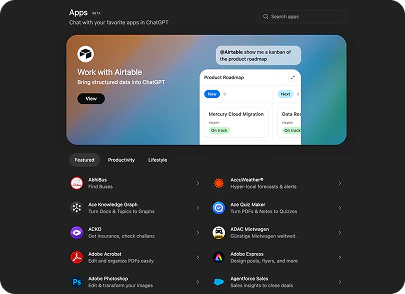
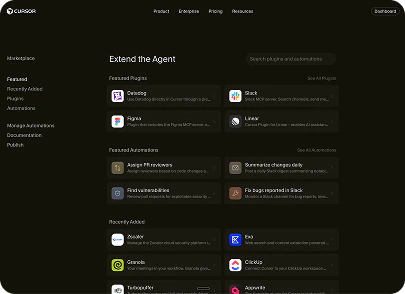
AI models are powerful in isolation, but they can’t act on the world without integrations - access to files, databases, APIs, browsers, and services. Traditionally, every team built these integrations from scratch, creating a fragmented ecosystem of one-off connectors. The Model Context Protocol (MCP) is an open standard (introduced by Anthropic in late 2024) that solves this. It defines a common language between AI applications and the servers that expose capabilities to them - so any MCP-compatible client can talk to any MCP-compatible server without custom integration code. Build a server once, and it works with Claude, ChatGPT, Cursor, or any other MCP host. Chat interfaces are becoming how most products are used. The major AI platforms now ship official MCP stores where you can publish your server and reach users directly inside their chat interface - no app install, no separate login. Together, these platforms give you access to roughly 1 billion weekly active users. Publishing on these stores is becoming one of the most powerful distribution channels for any product.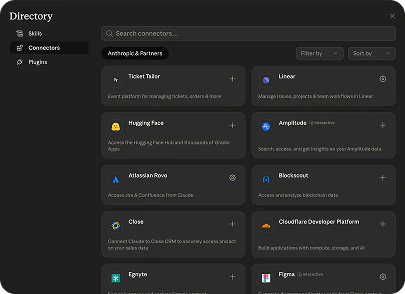
Architecture
MCP uses a client-server model with three roles:| Role | Responsibility |
|---|---|
| Host | The AI-powered application (your product, Claude Desktop, Cursor, ChatGPT) |
| Client | Runs inside the host; discovers and calls capabilities on MCP servers |
| Server | Exposes tools, resources, and prompts to any connected client |
MCP Server
An MCP server exposes three primitives:| Primitive | Controlled by | Purpose |
|---|---|---|
| Tools | Model | Functions the LLM calls to take actions |
| Resources | Application | Read-only data the client fetches on demand |
| Prompts | User | Reusable prompt templates and slash commands |
Tools
The most common primitive. The model decides when to call a tool and with what arguments - the server executes it and returns a result.Resources
Read-only data identified by a URI (file:///example.txt, db://users/123). The client application decides when to fetch them - not the model. Useful for surfacing context like file contents or query results.
Prompts
Templated instructions the user can invoke (think slash commands). The server defines the template; the client presents it to the user.MCP Apps
MCP Apps is the official standard for interactive UI widgets in the MCP ecosystem. Instead of returning plain text, a tool returns a rendered widget - a React component that runs directly inside Claude, ChatGPT, or any MCP-compatible client. Write the widget once and it works everywhere.resources/ folder and are auto-discovered - no manual registration needed. They communicate with the server over JSON-RPC and have full access to MCP tools and resources from the client side.
MCP Apps Guide
Widgets, auto-discovery, props, and client-side hooks.
Creating an MCP Apps Server
Step-by-step: scaffold and ship your first widget.
Building ChatGPT Apps
Ship an MCP App to ChatGPT specifically.
Debugging Widgets
Use the Inspector to test and debug your widgets.
MCP Client
Any application that speaks the MCP protocol is an MCP client - Claude Desktop, Cursor, ChatGPT, or your own product. Clients connect to servers, list their capabilities, and call tools on behalf of the model or user. The MCP Inspector is a good concrete example: it is an MCP client that connects to any server and lets you browse tools, call them manually, inspect resources, and monitor the protocol exchange in real time. It ships built-in with every mcp-use server at/inspector.
With mcp-use, MCPClient gives you a programmatic MCP client in Python and TypeScript:
Client Primitives
Clients can also implement primitives that reverse the flow - the server initiates a request back through the client:| Primitive | Flow | Purpose |
|---|---|---|
| Sampling | Server - LLM | Server asks the client to run an LLM completion |
| Elicitation | Server - User | Server asks the user for input mid-workflow |
| Roots | Server - Filesystem | Server requests access to specific paths |
| Notifications | Server - Client | Server sends real-time progress or status updates |
MCP Agent
An MCP Agent wraps an LLM around an MCP client: the model reasons about a task, selects tools, calls them, and iterates until done. mcp-use ships a full agent implementation for Python and TypeScript built on LangChain.Resources
Ready to build? Pick where you want to start - whether that’s exposing your first tool, embedding a widget in Claude, or connecting to an existing server programmatically. Each section of the docs has quickstarts, API references, and examples to get you running fast. For a deep dive into the protocol itself, see the official MCP documentation.Build an MCP Server
Expose tools, resources, and prompts to any AI client.
MCP Apps
Interactive widgets that run in Claude and ChatGPT.
MCP Inspector
Test and debug your MCP server in the browser.
MCP Client
Connect to any MCP server programmatically.
MCP Agent
AI agents that use MCP servers to complete tasks.
Examples
Runnable samples for Python and TypeScript.
Contacts
Get in touch- Email: founders@mcp-use.com
- Book a meeting: https://cal.com/mcp-use/founders
- LinkedIn: https://www.linkedin.com/company/mcp-use
- X: https://x.com/manufact
- Discord: https://discord.gg/XkNkSkMz3V
- Pietro Zullo: https://www.linkedin.com/in/pietrozullo/
- Luigi Pederzani: https://www.linkedin.com/in/luigipederzani/